
Gambling Content and Advertisement Blocking Strategies Guide
Learn how to block gambling-related content in your web browsers and on social media with our guides. Ad and content blocking is a tool for you, the consumer, to control what ads and posts you see and to avoid seeing those that may trigger gambling urges.
Index:
Ad Block – Desktop Web Browsers
Ad Block – Mobile Web Browsers
Limiting Gambling Ads on Instagram
Muting Words on Facebook for Mobile
Muting Words on Facebook for Desktop
Muting Words on Bluesky for Mobile
Web Browsers

Ad Blockers
Ad blockers are a useful tool for limiting the advertisements you see across the web. These include blocking pop-ups, banner ads, and video ads across platforms. Ad blockers are available for multiple browsers, including Google Chrome, Firefox, & Safari.
Ad Blocker Options (For Browser)
- AdBlock & AdBlock Plus
- AdBlock Plus: https://adblockplus.org/
- For Chrome: https://chromewebstore.google.com/detail/adblock-%E2%80%94-block-ads-acros/gighmmpiobklfepjocnamgkkbiglidom?hl=en-US
- For Firefox: https://addons.mozilla.org/en-US/firefox/addon/adblock-for-firefox/
- For Safari (Mac App Store): https://apps.apple.com/us/app/adblock-for-safari/id1402042596?mt=12
- Ublock Origin & UBO Lite
- Brave Browser (A dedicated browser for ad blocking)
Steps to Install Ad Blockers on Browser
Most browsers allow you to easily install ad blockers through the browser’s extension. Below is an example of how to do so on Google Chrome:
1 – Go to your ad blocker website of choice. Here, we will be using AdBlock through the Chrome Web Store.
2 – Add the ad blocking software to your browser. In this case, click the “Add to Chrome” button on the ad blocker’s web/store page (see below image).

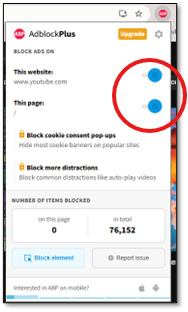
3 – The ad blocker should show up as an extension on your respective browser. In this case, AdBlock Plus appears as an extension at the top of your browser (see right image).
- Here, you can manage which websites you want the extension to block ads on (all websites are enabled by default)

Ad Blocker Options (For Mobile)
- AdGuard
- NextDNS
- Brave Browser (Mobile browser)
- For Android: https://play.google.com/store/apps/details?id=com.brave.browser&hl=en_US
- For iOS (in App Store): https://apps.apple.com/us/app/brave-browser-search-engine/id1052879175
Steps to Install Ad Blockers on Mobile
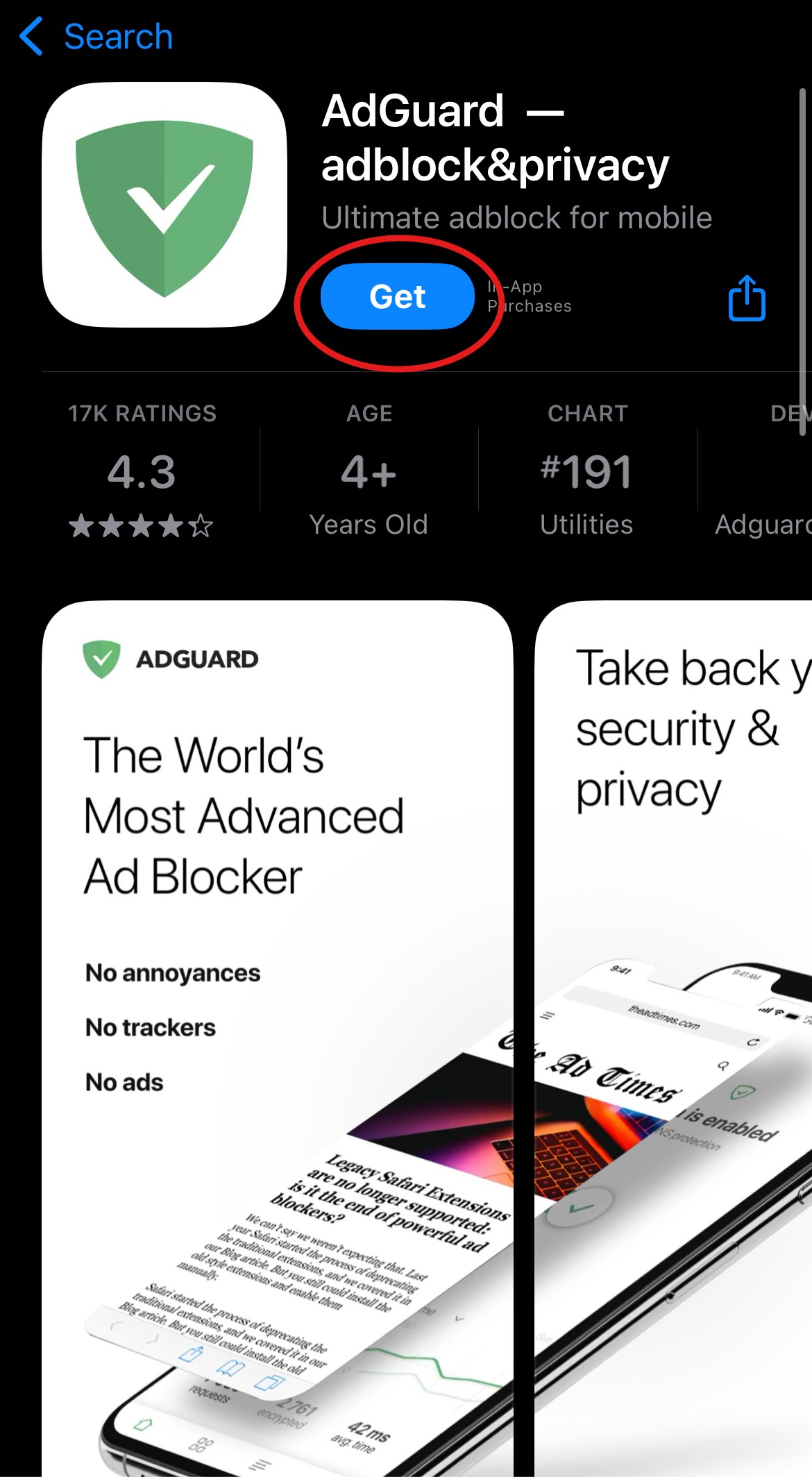
1 – Go to your device’s respective app store and search for your ad blocker of choice. Here we will be using AdGuard for iOS.
2 – Download the app onto your phone. In this case, tap the “Get” button to begin downloading (see image).
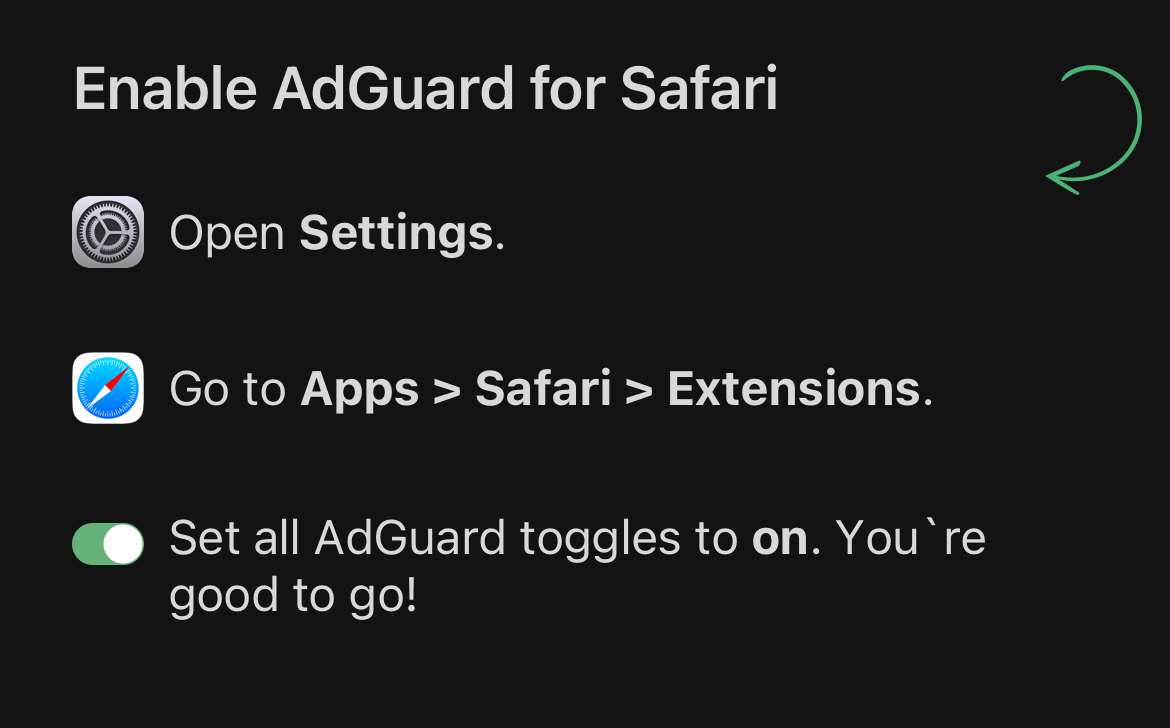
3 – Most ad blocking apps will require you to enable settings on your device. In this case, AdGuard requires you to enable ad blocking extensions for Safari (see image below).
- Note: Some ad blocking apps require you to pay a subscription fee to access advanced features. AdGuard, for example, has a subscription fee for access to Advanced protections, Security filters, DNS protection, and Custom filters ($4.99/yr or $0.99/mo). However, general ad blocking functions are typically free.
Social Media
Muting Words on Instagram

- Open the Instagram app
- Tap on your profile picture
- Tap the menu (≡) in the top-right corner
- Scroll down to the “What you see” category of options
- Tap Content preferences
- Tap Specific words and phrases
- In the field where it says “add words separated by commas”, you may create your own and/or copy and paste the following words:
gambling, casino, poker, betting, sportsbook, slots, blackjack, roulette, lottery, wager, odds, bet, parlay, fantasy sports, horse racing, gambling, casino, betting, poker, slots, blackjack, roulette, craps, sportsbook, wager, bet, betting odds, odds, moneyline, spread, parlay, over/under, teaser, live bet, in-play betting, fixed odds, fantasy sports, daily fantasy, DFS, FanDuel, DraftKings, BetMGM, Barstool Sportsbook, sports bet, online casino, free spins, jackpot, big win, lucky win, scratch card, scratcher, lotto, lottery, sweepstakes, slot machine, spin to win, spin win, risk-free bet, no risk bet, promo bet, VIP casino, match bonus, no deposit bonus, bet now, play to win, real money, betslip, crypto casino, bitcoin gambling, eth gambling, nft casino, virtual casino, online gambling, play slots, hit the jackpot, win real money, hot streak, gamble, gambling site, casino game, table games, slot games, betting tips, bet picks, parlays, accumulator, betting line, prop bet, stake, bet boost, boosted odds, super parlay, progressive jackpot, mega win, double down, place your bet, sports picks, online roulette, poker tournament, mobile casino, Vegas odds, Vegas lines, spread pick, underdog bet, sure bet, offshore sportsbook, e-sports betting, esports betting, live odds, bonus spins, free bet, real money game, instant win
- You may also add additional words/phrases if needed
Limiting Gambling Ads on Instagram
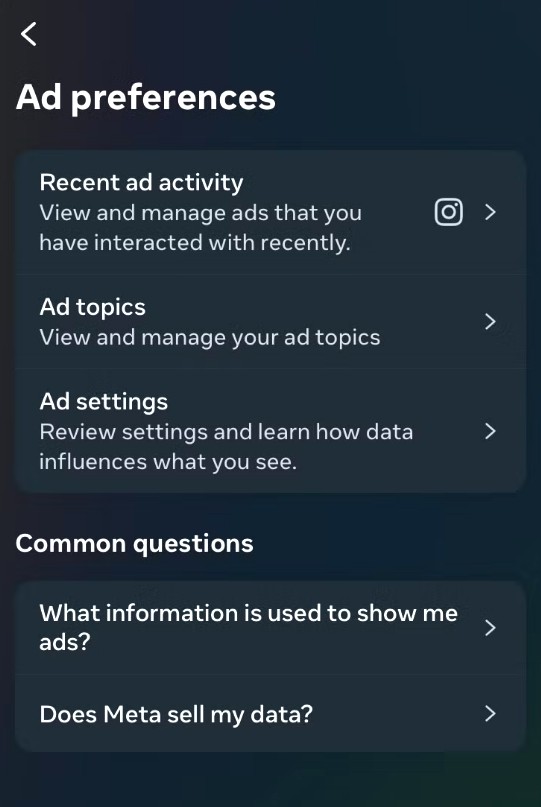
- Tap the menu icon (≡) in the top right corner
- At the top of the page, tap on Accounts Center
- In the Accounts Center, tap Ad preferences
- Scroll down to Ad topics
- Tap See all
- In the search bar at the top that says “Search ad topics”, type: “Gambling”
- When “Gambling” appears in the list, tap it
- Tap: See less (This tells Meta to reduce gambling ads across Instagram and Facebook.)
- We recommend that you add other related “ad topics” by repeating the process above for other categories like: Online gambling, sports betting, fantasy sports, casinos, lotteries, etc.
Note: The change takes effect immediately
Muting Words on Facebook Mobile (iOS or Android)

- Tap on the Profile icon at the top right-hand corner of your screen
- Scroll down and tap on Settings & privacy
- Tap Settings
- Scroll down and tap on Followers and public content
- Scroll down and tap Blocklist Filter
- In the “Limit 1,000 keywords.” Textbox, type gambling-related words/phrases, separated by commas, such as:
gambling, casino, poker, betting, sportsbook, slots, blackjack, roulette, lottery, wager, odds, bet, parlay, fantasy sports, horse racing, gambling, casino, betting, poker, slots, blackjack, roulette, craps, sportsbook, wager, bet, betting odds, odds, moneyline, spread, parlay, over/under, teaser, live bet, in-play betting, fixed odds, fantasy sports, daily fantasy, DFS, FanDuel, DraftKings, BetMGM, Barstool Sportsbook, sports bet, online casino, free spins, jackpot, big win, lucky win, scratch card, scratcher, lotto, lottery, sweepstakes, slot machine, spin to win, spin win, risk-free bet, no risk bet, promo bet, VIP casino, match bonus, no deposit bonus, bet now, play to win, real money, betslip, crypto casino, bitcoin gambling, eth gambling, nft casino, virtual casino, online gambling, play slots, hit the jackpot, win real money, hot streak, gamble, gambling site, casino game, table games, slot games, betting tips, bet picks, parlays, accumulator, betting line, prop bet, stake, bet boost, boosted odds, super parlay, progressive jackpot, mega win, double down, place your bet, sports picks, online roulette, poker tournament, mobile casino, Vegas odds, Vegas lines, spread pick, underdog bet, sure bet, offshore sportsbook, e-sports betting, esports betting, live odds, bonus spins, free bet, real money game, instant win
Note: You may also add additional words/phrases if needed
- Tap Save
Muting Words on Facebook Desktop Web Browser
- Click on the Profile icon at the top right-hand corner of your screen
- Scroll down and click on Settings & privacy
- Click Settings
- Click Followers and Public Content
- Click on Hide comments containing certain words from your profile
- In the “Limit 1,000 keywords.” Textbox, type gambling-related words/phrases, separated by commas, such as:
gambling, casino, poker, betting, sportsbook, slots, blackjack, roulette, lottery, wager, odds, bet, parlay, fantasy sports, horse racing, gambling, casino, betting, poker, slots, blackjack, roulette, craps, sportsbook, wager, bet, betting odds, odds, moneyline, spread, parlay, over/under, teaser, live bet, in-play betting, fixed odds, fantasy sports, daily fantasy, DFS, FanDuel, DraftKings, BetMGM, Barstool Sportsbook, sports bet, online casino, free spins, jackpot, big win, lucky win, scratch card, scratcher, lotto, lottery, sweepstakes, slot machine, spin to win, spin win, risk-free bet, no risk bet, promo bet, VIP casino, match bonus, no deposit bonus, bet now, play to win, real money, betslip, crypto casino, bitcoin gambling, eth gambling, nft casino, virtual casino, online gambling, play slots, hit the jackpot, win real money, hot streak, gamble, gambling site, casino game, table games, slot games, betting tips, bet picks, parlays, accumulator, betting line, prop bet, stake, bet boost, boosted odds, super parlay, progressive jackpot, mega win, double down, place your bet, sports picks, online roulette, poker tournament, mobile casino, Vegas odds, Vegas lines, spread pick, underdog bet, sure bet, offshore sportsbook, e-sports betting, esports betting, live odds, bonus spins, free bet, real money game, instant win
Note: You may also add additional words/phrases if needed
- Tap Save
Filtering your Email: Gmail

- Open Gmail:
- Sign in to your Gmail account
- Create a Filter:
- Click on the gear icon (Settings) in the upper-right corner
- Select “See all settings”
- Locate the “Filters and Blocked Addresses” tab
- Click “Create a new filter”
- Specify Filter Criteria:
- In the “Has the words” field, enter or copy and paste the following words:
gambling OR casino OR betting OR poker OR slots OR blackjack OR roulette OR craps OR sportsbook OR wager OR bet OR betting odds OR odds OR moneyline OR spread OR parlay OR over/under OR teaser OR live bet OR in-play betting OR fixed odds OR fantasy sports OR daily fantasy OR DFS OR FanDuel OR DraftKings OR BetMGM OR Bet365 OR Betway OR PointsBet OR WynnBet OR Caesars OR SugarHouse OR Barstool Sportsbook OR Unibet OR William Hill OR sports bet OR online casino OR free spins OR jackpot OR big win OR lucky win OR scratch card OR scratcher OR lotto OR lottery OR keno OR sweepstakes OR bingo OR pokerstars OR coinflip OR coin flip OR coin toss OR roulette wheel OR dealer OR chips OR high roller OR slot machine OR spin to win OR spin win OR risk-free bet OR no risk bet OR promo bet OR VIP casino OR lucky day OR get rich quick OR rakeback OR cash out OR match bonus OR no deposit bonus OR bet now OR play to win OR real money OR betslip OR crypto casino OR bitcoin gambling OR eth gambling OR nft casino OR virtual casino OR online gambling OR play slots OR hit the jackpot OR win real money OR hot streak OR gamble OR gambling site OR casino game OR table games OR slot games OR betting tips OR bet picks OR parlays OR accumulator OR betting line OR prop bet OR stake OR bet boost OR boosted odds OR super parlay OR progressive jackpot OR mega win OR double down OR place your bet OR sports picks OR online roulette OR poker tournament OR mobile casino OR Vegas odds OR Vegas lines OR spread pick OR underdog bet OR sure bet OR offshore sportsbook OR horse racing OR greyhound betting OR e-sports betting OR esports betting OR live odds OR bonus spins OR free bet OR real money game OR instant win.
Note: You may also add additional words/phrases if needed
- Set the Action:
-
- After entering the keywords, click “Create filter”
- In the next window, choose what you want Gmail to do with the filtered emails. For example, check “Skip the Inbox,” or “Delete it” to automatically handle gambling-related emails. Note: It is recommended that you select “Delete it” so that you do not accidentally view gambling-related emails in your archive folder.
- You can also apply the filter to existing emails by checking “Also apply filter to matching conversations” at the bottom of the list.
- Save the Filter:
- Click “Create filter” to save your settings
Filtering your Email: Yahoo

- Open Yahoo
- Sign in to your Yahoo account
- Access Settings:
- Click on the gear icon in the upper-right corner
- From the dropdown, click on More Settings
- If gear icon is not visible, click on the three dots at the bottom of the icon list on the left side of your screen and click settings
- Create a Filter:
- In the left-hand menu, click on Filters
- Click the Add new filters button
- Set Filter Criteria:
- Click Type a filter name and provide a filter name (e.g., “Gambling Emails”)
- In the Set rules section, tap/click the arrows next to From, Subject, and Body
- Click Select filter criterion and select “contains” for each one
- Click on Type a filter value and enter gambling-related keywords such as:
Casino, poker, betting, sportsbook, slots, blackjack, roulette, lottery, wager, odds, bet, parlay, fantasy sports, horse racing, gambling, casino, betting, poker, slots, blackjack, roulette, craps, sportsbook, wager, bet, betting odds, odds, moneyline, spread, parlay, over/under, teaser, live bet, in-play betting, fixed odds, fantasy sports, daily fantasy, DFS, FanDuel, DraftKings, BetMGM, Barstool Sportsbook, sports bet, online casino, free spins, jackpot, big win, lucky win, scratch card, scratcher, lotto, lottery, sweepstakes, slot machine, spin to win, spin win, risk-free bet, no risk bet, promo bet, VIP casino, match bonus, no deposit bonus, bitcoin gambling, eth gambling, nft casino, virtual casino, online gambling, play slots, hit the jackpot, win real money, hot streak, gamble, gambling site, casino game, table games, slot games, betting tips, bet picks, parlays, accumulator, Vegas odds, Vegas lines, spread pick, underdog bet, sure bet, offshore sportsbook, e-sports betting, esports betting, live odds, bonus spins, free bet, real money game, instant win
Note: You may also add additional words/phrases if needed
- Choose the Action:
- In the “Choose a folder to move to” section, choose the destination folder for emails that match the filter. You can either create a new folder or select Trash if you want to delete them automatically.
- Save the Filter:
- Once you have set the rules and selected the ac
Muting Words on X Mobile formerly, Twitter (iOS or Android)

- Open the X app on your mobile device.
- Tap your profile icon in the top-left corner
- Tap Settings & Support
- Tap Settings and privacy
- Tap Privacy and safety
- Tap Mute and block
- Tap Muted words
- Tap Add or the plus (+) icon in the lower right-hand corner
- In the “Enter word or phrase” field, type a gambling-related word, such as:
Note: You must enter each word/phrase individually and tap Save for each word/phrase
gambling, casino, poker, betting, sportsbook, slots, blackjack, roulette, lottery, wager, odds, bet, parlay, fantasy sports, horse racing, gambling, casino, betting, poker, slots, blackjack, roulette, craps, sportsbook, wager, bet, betting odds, odds, moneyline, spread, parlay, over/under, teaser, live bet, in-play betting, fixed odds, fantasy sports, daily fantasy, DFS, FanDuel, DraftKings, BetMGM, Barstool Sportsbook, sports bet, online casino, free spins, jackpot, big win, lucky win, scratch card, scratcher, lotto, lottery, sweepstakes, slot machine, spin to win, spin win, risk-free bet, no risk bet, promo bet, VIP casino, match bonus, no deposit bonus, bet now, play to win, real money, betslip, crypto casino, bitcoin gambling, eth gambling, nft casino, virtual casino, online gambling, play slots, hit the jackpot, win real money, hot streak, gamble, gambling site, casino game, table games, slot games, betting tips, bet picks, parlays, accumulator, betting line, prop bet, stake, bet boost, boosted odds, super parlay, progressive jackpot, mega win, double down, place your bet, sports picks, online roulette, poker tournament, mobile casino, Vegas odds, Vegas lines, spread pick, underdog bet, sure bet, offshore sportsbook, e-sports betting, esports betting, live odds, bonus spins, free bet, real money game, instant win
Note: You may also add additional words/phrases if needed
- Under “Mute from”, select:
- Home timeline
- Notifications
- Under “Duration”, tap Change mute time, and select:
- Forever (recommended)
- Tap Save. If you are unable to tap Save, you may have to tap Anyone underneath “Notifications”
- Repeat the process for each word/phrase you want to mute
Muting Words on X Desktop Web Browser formerly, Twitter
- Go to X.com and log in to your account
- Click the More icon (…) in the left sidebar
- Click Settings and privacy
- Click Privacy and safety
- Click Mute and block
- Click Muted words
- Click the Add or plus (+) icon in the top right-hand corner
- In the “Enter word or phrase” field, type a gambling-related word, such as:
Note: You must enter each word/phrase individually and tap Save for each word/phrase
gambling, casino, poker, betting, sportsbook, slots, blackjack, roulette, lottery, wager, odds, bet, parlay, fantasy sports, horse racing, gambling, casino, betting, poker, slots, blackjack, roulette, craps, sportsbook, wager, bet, betting odds, odds, moneyline, spread, parlay, over/under, teaser, live bet, in-play betting, fixed odds, fantasy sports, daily fantasy, DFS, FanDuel, DraftKings, BetMGM, Barstool Sportsbook, sports bet, online casino, free spins, jackpot, big win, lucky win, scratch card, scratcher, lotto, lottery, sweepstakes, slot machine, spin to win, spin win, risk-free bet, no risk bet, promo bet, VIP casino, match bonus, no deposit bonus, bet now, play to win, real money, betslip, crypto casino, bitcoin gambling, eth gambling, nft casino, parlays, accumulator, betting line, prop bet, stake, bet boost, boosted odds, super parlay, progressive jackpot, mega win, double down, place your bet, sports picks, online roulette, poker tournament, mobile casino, Vegas odds, Vegas lines, spread pick, underdog bet, sure bet, offshore sportsbook, e-sports betting, esports betting, live odds, bonus spins, free bet, real money game, instant win
Note: You may also add additional words/phrases if needed
- Under “Mute from”, select:
- Home timeline
- Notifications
- Under “Duration”, select:
- “The mute duration”
- Until you unmute the word (recommended)
- Click Save
- Repeat the process for each word/phrase you want to mute
Muting Words on Bluesky Mobile (iOS or Android)

- Open the Bluesky app from your device
- Tap the menu icon (≡) in the upper left-hand corner
- Tap on Settings from the drop-down menu
- Tap on Moderation
- Under “Moderation tools”, tap Muted words & Tags
- In the “Enter a word or tag” textbox, type a gambling-related word, such as:
Note: You must enter each word/phrase individually and tap Save for each word/phrase
gambling, casino, poker, betting, sportsbook, slots, blackjack, roulette, lottery, wager, odds, bet, parlay, fantasy sports, horse racing, gambling, casino, betting, poker, slots, blackjack, roulette, craps, sportsbook, wager, bet, betting odds, odds, moneyline, spread, parlay, over/under, teaser, live bet, in-play betting, fixed odds, fantasy sports, daily fantasy, DFS, FanDuel, DraftKings, BetMGM, Barstool Sportsbook, sports bet, online casino, free spins, jackpot, big win, lucky win, scratch card, scratcher, lotto, lottery, sweepstakes, slot machine, spin to win, spin win, risk-free bet, no risk bet, promo bet, VIP casino, match bonus, no deposit bonus, bet now, play to win, real money, betslip, crypto casino, bitcoin gambling, eth gambling, nft casino, parlays, accumulator, betting line, prop bet, stake, bet boost, boosted odds, super parlay, progressive jackpot, mega win, double down, place your bet, sports picks, online roulette, poker tournament, mobile casino, Vegas odds, Vegas lines, spread pick, underdog bet, sure bet, offshore sportsbook, e-sports betting, esports betting, live odds, bonus spins, free bet, real money game, instant win
Note: You may also add additional words/phrases if needed
- Under “Duration”, select: Forever
- Under “Mute in” select: Text & tags (recommended)
- Tap Add +
- Repeat the process for each word/phrase you want to mute
Muting Words on Bluesky Desktop Web Browser
- Go to Bluesky and log in to your account
- Click the Settings icon towards the bottom of the left sidebar
- Click Moderation
- Click on Muted words & tags
- In the “Enter a word or tag” textbox, enter a gambling-related word/phrase, such as:
Note: You must enter each word/phrase individually and tap Save for each word/phrase
gambling, casino, poker, betting, sportsbook, slots, blackjack, roulette, lottery, wager, odds, bet, parlay, fantasy sports, horse racing, gambling, casino, betting, poker, slots, blackjack, roulette, craps, sportsbook, wager, bet, betting odds, odds, moneyline, spread, parlay, over/under, teaser, live bet, in-play betting, fixed odds, fantasy sports, daily fantasy, DFS, FanDuel, DraftKings, BetMGM, Barstool Sportsbook, sports bet, online casino, free spins, jackpot, big win, lucky win, scratch card, scratcher, lotto, lottery, sweepstakes, slot machine, spin to win, spin win, risk-free bet, no risk bet, promo bet, VIP casino, match bonus, no deposit bonus, bet now, play to win, real money, betslip, crypto casino, bitcoin gambling, eth gambling, nft casino, parlays, accumulator, betting line, prop bet, stake, bet boost, boosted odds, super parlay, progressive jackpot, mega win, double down, place your bet, sports picks, online roulette, poker tournament, mobile casino, Vegas odds, Vegas lines, spread pick, underdog bet, sure bet, offshore sportsbook, e-sports betting, esports betting, live odds, bonus spins, free bet, real money game, instant win
Note: You may also add additional words/phrases if needed
- Under “Duration”, select: Forever
- Under “Mute in” select: Text & tags (recommended)
- Tap Add +
- Repeat the process for each word/phrase you want to mute
Blocking Videos on TikTok:

Note: While you cannot block all gambling-related videos, you can gradually change the types of videos seen
- Go to your TikTok app and log in to your account
- When you navigate to a post related to gambling, tap on the Share button from the sidebar on the right side of the screen
- From all the “share” options, tap Not Interested
- This will remove the video from your home screen, and you will see fewer videos related to the “Not Interested” video
Blocking Comments on TikTok Videos:
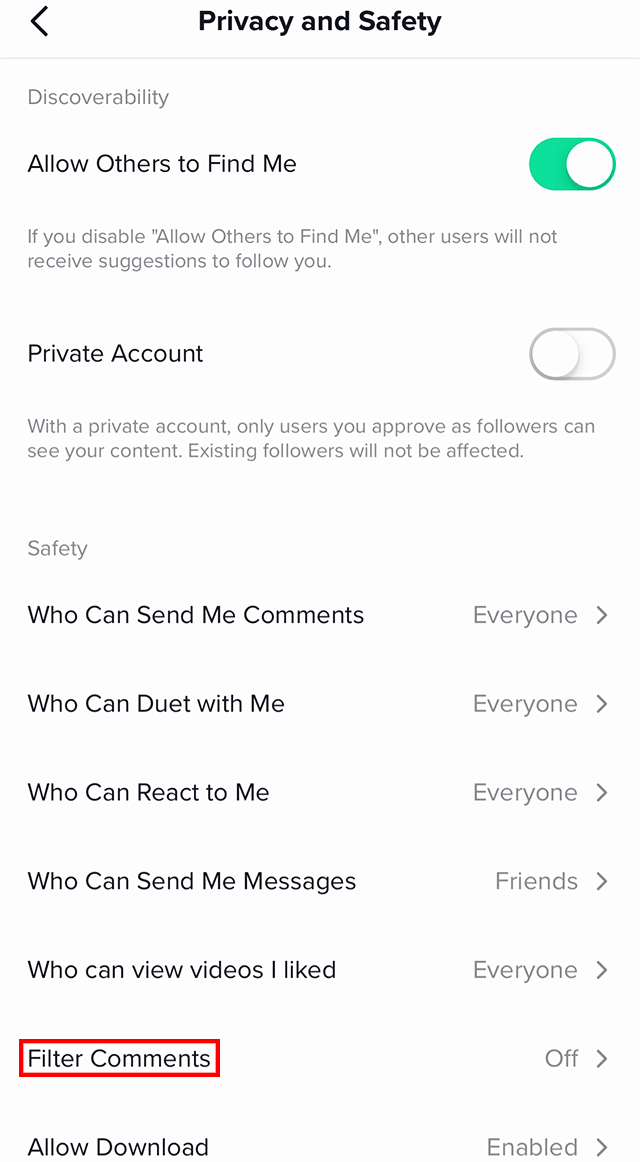
Note: This will cause TikTok to automatically hide comments containing those specific words
- Tap the menu icon (≡) located at the top right-hand corner
- Tap Settings and privacy
- Tap Account
- Tap Privacy
- Scroll down until you see Comments and tap Comments
- Tap Filter specific keywords
- Tap the switch next to Filter specific keywords
- In the “Add keywords” textbox, enter gambling-related words, such as:
gambling, casino, poker, betting, sportsbook, slots, blackjack, roulette, lottery, wager, odds, bet, parlay, fantasy sports, horse racing, gambling, casino, betting, poker, slots, blackjack, roulette, craps, sportsbook, wager, bet, betting odds, odds, moneyline, spread, parlay, over/under, teaser, live bet, in-play betting, fixed odds, fantasy sports, daily fantasy, DFS, FanDuel, DraftKings, BetMGM, Barstool Sportsbook, sports bet, online casino, free spins, jackpot, big win, lucky win, scratch card, scratcher, lotto, lottery, sweepstakes, slot machine, spin to win, spin win, risk-free bet, no risk bet, promo bet, VIP casino, match bonus, no deposit bonus, bet now, play to win, real money, betslip, crypto casino, bitcoin gambling, eth gambling, nft casino, parlays, accumulator, betting line, prop bet, stake, bet boost, boosted odds, super parlay, progressive jackpot, mega win, double down, place your bet, sports picks, online roulette, poker tournament, mobile casino, Vegas odds, Vegas lines, spread pick, underdog bet, sure bet, offshore sportsbook, e-sports betting, esports betting, live odds, bonus spins, free bet, real money game, instant win
Note: You may also add additional words/phrases if needed